Microsoft has announced Copilot enhancements across Outlook, Word, and PowerPoint that improve scheduling, document creation, and presentation building. Here is a summary of some of the features I think can come in handy. Be aware that timelines may change as deployments progress, some of these have already been pushed back a couple of months. All of the following features requires a Microsoft 365 Copilot license, and will be enabled by default for users with such a license.
 Automatic rescheduling of 1:1 meetings
Automatic rescheduling of flexible 1:1 meetings and personal events in Outlook with Copilot, helping users resolve conflicts with minimal manual effort is coming soon. This will be in addition to the already released auto rescheduling of meeting rooms. Originally this feature was planned for mid‑November 2025 to mid‑January 2026, but is now hopefully coming between to mid‑February 2026 and the end of February 2026. A Microsoft Copilot license is required to use the capability.
Within the meeting event form, users can mark events as flexible and set preferences for when they should be moved; Copilot will detect double‑bookings and automatically shift those events to a better time.
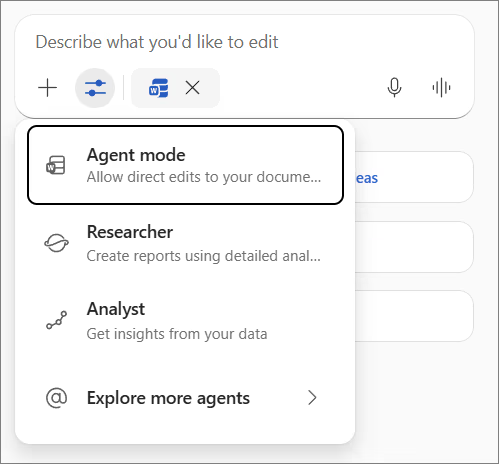 Agent Mode in Microsoft 365 Copilot in Word
The Agent Mode in Microsoft 365 Copilot in Word, will enable a more conversational and iterative way to draft content, reorganize information, and rewrite sections directly on the canvas while preserving user control through review and approval.
This was originally planned for a release between October 2025 and early December 2025, but was postponed over new years, and should be on it's way now.
With this agent, ssers with a Microsoft 365 Copilot license can ask Copilot to create new documents or transform existing content into more structured formats, such as FAQs, with native edits applied in Word.
Read more about it at the Microsoft 365 Blog announcement “Vibe working: Introducing Agent Mode and Office Agent in Microsoft 365 Copilot” and the Microsoft Support article “Agent mode in Word.”
This update is associated with Roadmap ID 499428
Agent Mode in Microsoft 365 Copilot in PowerPoint
The Agent Mode in PowerPoint for the web, allowing users to create, edit, and refine presentations through natural conversation while preserving formatting, structure, and branding is also on it's way. Currently it's targeted for General Availability (Worldwide) in mid‑February 2026 and complete the rollout by mid‑March 2026.
With Agent Mode, users can start from scratch or iterate on an existing deck, ask Copilot to produce slides, improve layouts, polish design, and apply brand templates tied to the organization’s brand kit. Copilot can also leverage organizational content such as files, meetings, and emails to accelerate iteration. This update is associated with Microsoft 365 Roadmap entries 548520 and 548646.
Thank you for reading. If you found this useful, follow me on LinkedIn for more Microsoft 365 updates and rollout guidance.
Comments