Over the past few weeks, several user-focused enhancements have appeared in the Microsoft 365 Message Center. While none of the updates covered in this post currently have corresponding Microsoft 365 Roadmap entries, they provide a useful look at upcoming changes that users may start noticing across Microsoft 365, Teams, Copilot, OneDrive, and SharePoint in the coming months.
 Microsoft 365 introduces a new file sharing experience
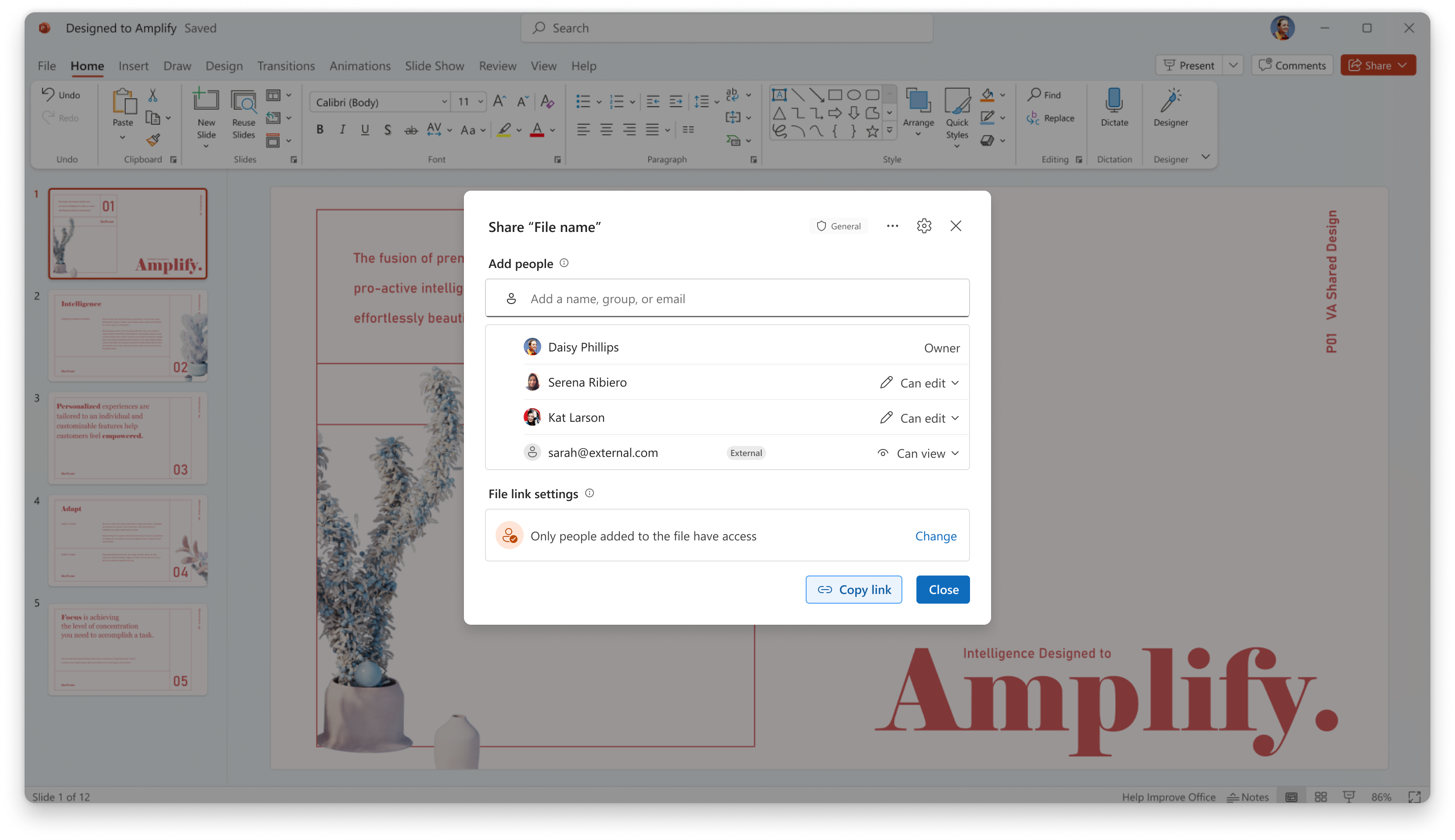
Microsoft has announced an updated sharing experience for SharePoint and OneDrive, based on a single primary sharing link referred to as the "hero link". The change is intended to make sharing more consistent by using the same link across the Share dialog, copied links, and browser URLs.
For users, the most noticeable change is that permissions can be adjusted on an existing sharing link rather than creating and redistributing a new one. By default, hero links will be configured as "Only people added to the file", meaning the link itself does not grant access beyond explicitly added users. Where allowed by organizational policy, access can be broadened to people in the organization or anyone with the link.
Existing sharing links will continue to work and will be available under "Other links" in the sharing dialog. Users will also see a short introduction to the new experience the first time they open the updated sharing interface.
Rollout is expected to begin in mid-September 2026 and complete by late October 2026 across Worldwide, GCC, GCC High, and DoD environments. As always, Microsoft timelines may change.
More information:
 Ask Copilot directly from Teams conversations
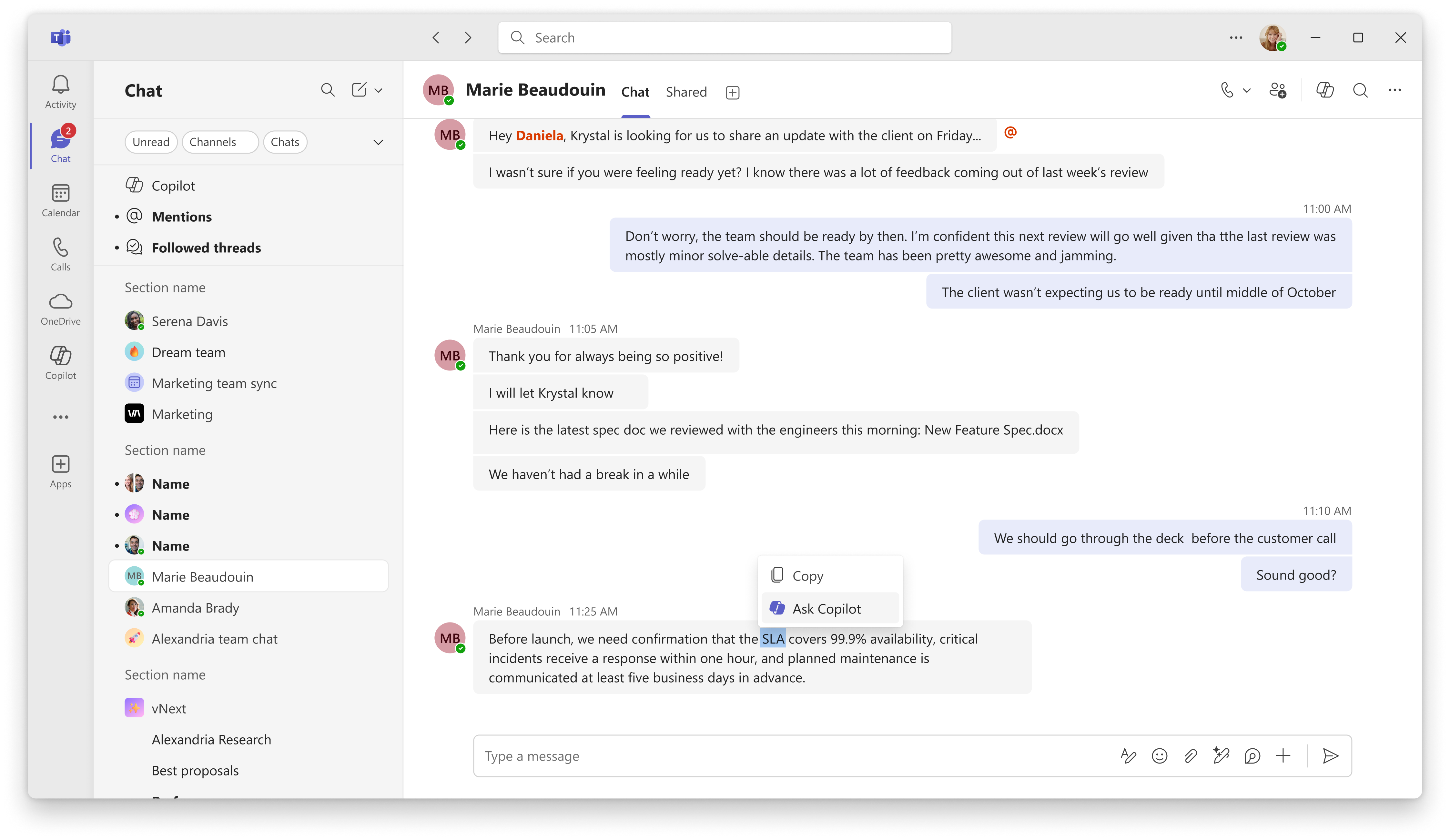
Ask Copilot is a new Teams feature that lets users send a message, or selected text from a message, directly to Copilot without needing to copy and paste content manually. The selected conversation content is automatically included as context, making it easier to ask follow-up questions or request assistance based on a specific discussion.
The feature is available in 1:1 chats, group chats, meeting chats, and channel conversations across Teams desktop, web, and mobile clients. On desktop and web, users can launch Ask Copilot from the message actions menu or by selecting text within a message. On mobile devices, the option is available by pressing and holding a message.
The update uses the existing Copilot experience in Teams and does not introduce any new administrative controls. Access continues to follow existing Teams Copilot licensing and policy settings.
Rollout is expected to begin in late August 2026 and complete by late September 2026. As always, Microsoft timelines may change.
PowerPoint gets a Copilot-powered reading guide for presentations
A new Copilot capability in PowerPoint can generate a reading guide for presentations, helping users review and understand slide decks more efficiently. The feature analyzes the entire presentation, including slides, charts, tables, visuals, and speaker notes, and presents an overview of the content.
The reading guide highlights the presentation's main idea, key takeaways, important numbers, relevant visuals, speaker notes, and any open questions identified in the material. The goal is to provide a quick way to understand a presentation without having to review every slide in detail.
The feature is rolling out to Frontier users in September 2026 and is available in PowerPoint for Windows desktop. A Microsoft 365 Copilot license is required.
Copilot Pages makes it easier to reference existing Pages in chat
Copilot Pages is getting a small update that changes how existing and new Pages are accessed within the Copilot experience. Users will now find existing Pages through the Library tab and can reference them directly in a Copilot chat using the "/" menu in the prompt box.
As part of this change, the Edit in Pages option will focus on creating new Pages from Copilot conversations rather than browsing existing ones. Existing Pages, content, and sharing permissions are not affected by the update.
Rollout began in late August 2026 and is expected to complete by early September 2026. As always, Microsoft timelines may change.
Closing thoughts
Many of the recent user-focused announcements center around reducing friction in day-to-day work. Whether it's sharing files, interacting with Copilot, reviewing presentations, or working with Pages, these updates aim to make existing experiences a little more intuitive and accessible.
If you'd like to stay up to date with Microsoft 365, Copilot, Teams, security, compliance, and AI-related announcements, you can follow me on LinkedIn: https://www.linkedin.com/in/lawedo/
Comments